❄️ De-frost

Detect, analyze, and eliminate frozen frames in your React Native apps with precision. Track performance bottlenecks at the component level and optimize your app's rendering pipeline.

The React Native Performance Gap

Traditional Android tools detect frozen frames but can't tell you which React component caused them

❌ Traditional Tools

Standard profilers detect frozen frames and provide stack traces, but they only point to native rendering code—not your JavaScript components.

⚛️
JavaScript
Your Code
🤖
Native
Rendering
💔
No Connection
Stack traces are useless
😵 Can't identify which JavaScript component caused the frozen frame
✅ With De-frost

De-frost tracks React component state changes (commits) and correlates them with native frame rendering—bridging the JavaScript ↔ Native gap.

⚛️
JavaScript
Your Code
❄️De-frost
🤖
Native
Rendering
🌉
React Commit Tracking
Links JS changes to frames
🎯 Identifies the exact JavaScript component that caused the frozen frame

See It In Action

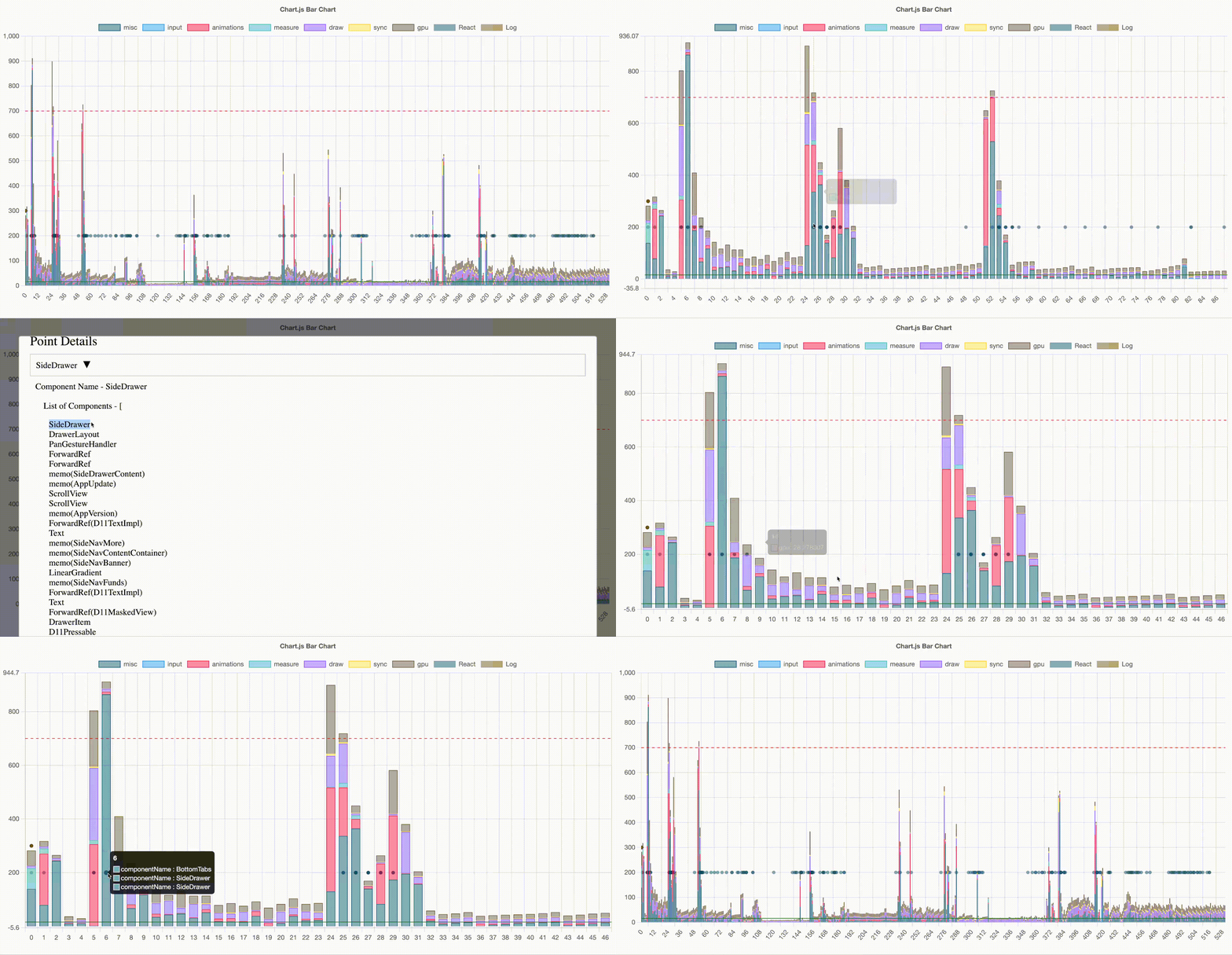
Visualize frame rendering performance with detailed breakdowns of each pipeline stage. Instantly identify frozen frames (red line at 700ms) and optimize your app's rendering.

Frame Rendering Performance Analysis
Misc/Vsync
Input
Animations
Measure
Draw
Sync
GPU
React
Log
Frozen Frame (>700ms)
Slow Frame (>16ms)

🎯 Pro Tip: Look for bars crossing the red threshold line—those are frozen frames! The chart breaks down each frame by rendering stage (animations, draw, GPU, etc.) so you know exactly where to optimize.

Why Choose De-frost?

Powerful features designed to help you build butter-smooth React Native applications

🧊

Detect Frozen Frames

Automatically identify frames taking over 700ms to render. See detailed breakdowns across 9 rendering pipeline stages including animations, draw, GPU, and more.

Minimal Overhead

Designed to work efficiently without adding unnecessary load, ensuring your app remains smooth and responsive during development and testing.

🔌

Simple CLI Commands

Three easy commands to create builds, record data, and visualize results. No complex setup—just install, run, and analyze your app's performance.

🎯

React Commit Tracking

Track React component state changes and correlate them with frame rendering. See which component updates cause performance bottlenecks in real-time.

📊

Interactive Dashboard

Visual web dashboard with bar graphs and scatter plots. Export data as CSV for further analysis and share reports with your team.

🏗️

New Architecture Ready

Fully compatible with React Native's new architecture including TurboModules and Fabric. Future-proof your performance monitoring.